
Benefits Of Intergraph® Smart Support

Intergraph Smart Support is a web portal through which customers may submit technical support requests and find Intergraph CAS technical information. There are several customer benefits for using the Smart Support website including: All questions and issues will be entered into the Smart Support system. This will help ensure that no items are lost when […]
How To Get Separate Report For Foundation Loads From PV Elite Software

This is the new feature of PV Elite 2016 by adding an option to separate the foundation load information. Previously, the software only displayed basering and foundation load information on the Vessel Design Summary report. You can now select Foundation Loads on a New Page on the Configuration dialog which will result in the basering and foundation […]
Line Numbering System In CADWorx Plant Professional 2016
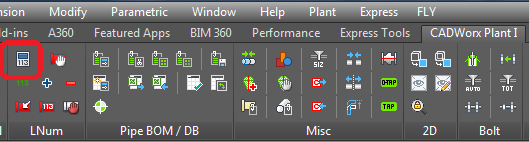
CADWorx Plant Professional 2016 I tab: LNum > Setup Line Number toolbar: Setup Plant menu: Accessory > Line Numbers > Setup Command line: NUMBERSETUP Modifies any line number configuration. You can turn the line numbering system on or off. If the system is on, it can operate in a static or dynamic mode. In the dynamic mode, CADWorx adjusts […]
ImageGrafix’s Wednesday Webinars – Free Online Technical Trainings – What Is New In PV Elite 2016

Date: January 6, 2016 Time: 09.00 AM(Qatar, Kuwait, Bahrain) 10.00 AM (UAE, Oman) 11.30 AM (India) 02.00 PM (Singapore) Duration: 30 Min Cost: Free Webinar PVElite offers a complete solution for vessel and heat exchanger design, analysis, and evaluation. Find out what’s new in the latest version of Intergraph’s powerful software. Explore the new features […]
Command Of The Week CADWorx PLANT 2016 Usershape
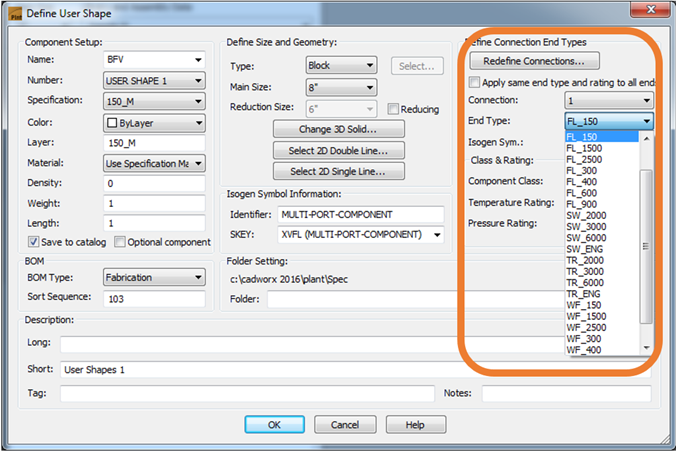
In CADWorx Plant 2016 we can define the Component endtypes from Spec & Define any type of End connection to Usershape. Now this option gives the Proper Bolt length and number of bolts.
Intergraph CADWorx & Analysis Solutions – Technology Day – 2015 – Cairo Egypt
Enter The # New Engineering Era Of Plant Design & Analysis
Intergraph’s Two Product Strategy
The Topic Highlights the details of Intergraph’s Two Product Strategy and Why smaller projects still deserve high quality tools for quality deliverables and also talks about the role of ImageGrafix in increasing success rate and the confidence level of CADWorx users in India and Middle East.
CADWorx Command of the Week [Isometric Continuation Display]
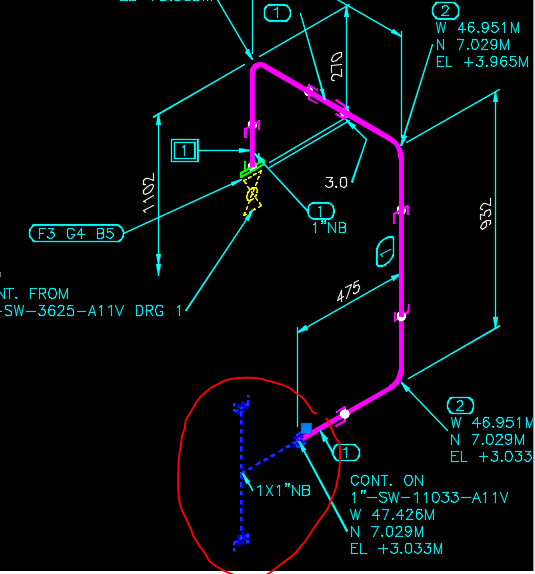
In CADWorx Plant we can set the variable for showing the Pipe line continuation display for different line number in Isometric drawing output. ISOGEN Continuation Graphics Count Default value: 0 Allowed values: 0, 1, 2, or 3 Displays continuation graphics based on the following selections: 0 – Display no continuation graphics when running ISOGEN. 1 – Display […]
When Intelligent P&IDs Are Not Enough
While the P&ID has been the ‘go-to’ document for the representation of the process and functionality of a facility, it is unfortunate that much of the rich data that P&IDs represent in the real world is seldom even available at the time of their creation. Vornel Walker, vice president of Product Marketing at Intergraph CADWorx […]